Operating system
Linux
An open-source family of operating systems used to run servers, containers, developer environments, and cloud infrastructure.
Major concepts or components
Linux at a glance.
Follow the map, then explore the building blocks below.
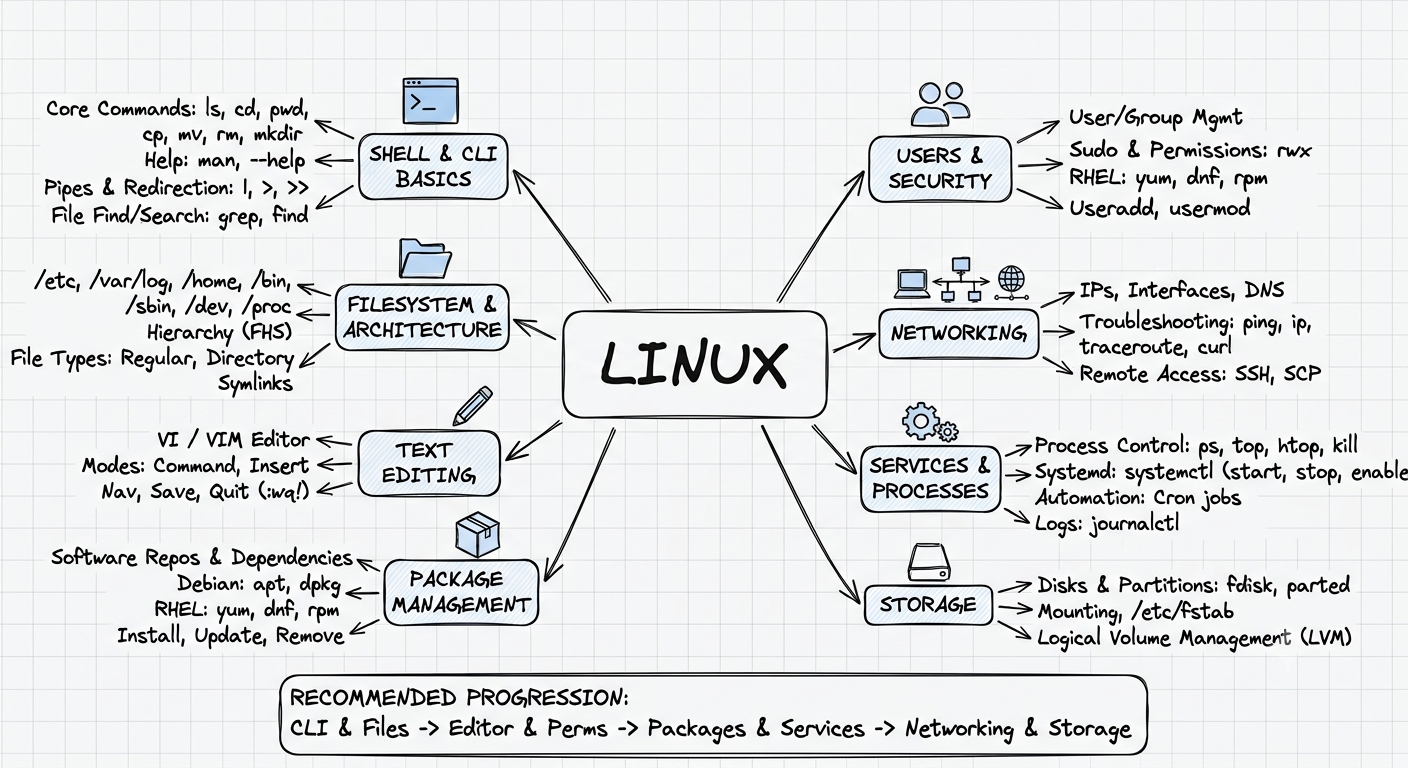
Sub-glossary
Interview question ↗Linux vocabulary.
A practical reference for the commands, paths, tools, and concepts shown in the map.
- pwd
- Prints the current working directory.
- ls / cd
- Lists directory contents and changes directories.
- cp / mv / rm
- Copies, moves, renames, and removes files or directories.
- Pipes & redirection
- Connects command output or writes it to files with `|`, `>`, and `>>`.
- grep / find
- Searches text and locates files by name or other attributes.
- /etc /var /home
- Common locations for configuration, changing system data, and user files.
- /bin /sbin /dev /proc
- Locations for executables, administration tools, devices, and process metadata.
- FHS
- Filesystem Hierarchy Standard: conventions for where Linux stores system content.
- File types
- Regular files, directories, and symbolic links are common filesystem entry types.
- vi / Vim
- Modal terminal editors commonly available on Linux systems.
- Command / insert modes
- Vim uses command mode for navigation and insert mode for typing.
- :w / :q / :wq
- Save, quit, and save-then-quit commands in Vim.
- Repositories & dependencies
- Package sources and the software relationships needed for an install.
- apt / dpkg
- Debian-family tools for dependency-aware and low-level package operations.
- yum / dnf / rpm
- Red Hat-family tools for dependency-aware and low-level RPM operations.
- Install / update / remove
- The basic lifecycle for adding, maintaining, and uninstalling software.
- User / group management
- Identities and collections used to assign ownership and access.
- sudo
- Runs an approved command with elevated privileges.
- rwx permissions
- Read, write, and execute access for owner, group, and others.
- useradd / usermod
- Creates accounts and changes their properties, groups, or shells.
- IPs / interfaces / DNS
- Addresses, network connections, and hostname resolution.
- ping / ip / traceroute
- Checks reachability, inspects local networking, and traces network hops.
- SSH / SCP
- Secure remote shell access and secure file copying.
- ps / top / htop / kill
- Inspects, monitors, and signals running processes.
- systemd / systemctl
- The service manager and its command-line control utility.
- Cron jobs
- Scheduled commands that run at recurring times.
- journalctl
- Reads logs collected by the systemd journal.
- Disks & partitions
- Block devices and the regions carved out for filesystems.
- fdisk / parted
- Utilities for inspecting and editing partition tables.
- Mounting /etc/fstab
- Attaches filesystems to directories and records persistent mounts.
- LVM
- Logical Volume Management for flexible physical and logical storage.
Shell & CLI basics
pwdls -la && cd /var/logFilesystem & architecture
Text editing
Package management
Users & security
Networking
Services & processes
Storage
Problem it solves
Why it exists.
It solves the need for a stable, automatable, scriptable operating environment across local and production systems.
Optimized for
Where it shines.
Servers, containers, cloud instances, automation runners, and workloads that benefit from composable command-line tooling.
Use with care
Where not to use it.
Do not treat a distribution choice as a complete security or operations strategy, and do not assume every workload needs Linux-specific administration.
Components
What it is made of.
- Kernel
- Distribution and packages
- Shell and processes
- Filesystem and permissions
- Networking
Process
How it works.
- A system boots the kernel and services
- Processes run with permissions and resources
- Operators automate through the shell and APIs
- Packages and configuration are updated declaratively